Adding additional VIP to Azure Load Balancer

Recently, a partner needed guidance on adding an additional VIP to an Azure Load Balancer. This is a typical scenario where multiple SSL-based websites are running on a pair of servers and clients may not have SNI support, necessitating dedicated public IP’s for each website. Azure Load Balancer in Azure Resource Manager does support multiple VIP’s, just not via the portal. Not to worry, Powershell to the rescue. The Azure documentation site has a great article describing the process of deploying a two-node web farm and internet facing load balancer. These commands assume you’ve already deployed the load balancer and are just adding a second VIP:

Login-AzureRmAccount
Select-AzureRmSubscription -SubscriptionId 00000000-0000-0000-0000-000000000000

#Get the Resource Group
$rg = Get-AzureRmResourceGroup -Name "MultiVIPLBRG"

#Get the Load Balancer
$slb = Get-AzureRmLoadBalancer -Name "MultiVIPLB" -ResourceGroupName $rg.ResourceGroupName

#Create new public VIP
$vip2 = New-AzureRmPublicIpAddress -Name "PublicVIP2" -ResourceGroupName $rg.ResourceGroupName -Location $rg.Location -AllocationMethod Dynamic

#Create new Frontend IP Configuration using new VIP
$feipconfig2 = New-AzureRmLoadBalancerFrontendIpConfig -Name "MultiVIPLB-FE2" -PublicIpAddress $vip2
$slb | Add-AzureRmLoadBalancerFrontendIpConfig -Name "MultiVIPLB-FE2" -PublicIpAddress $vip2

#Get Backend Pool
$bepool = $slb | Get-AzureRmLoadBalancerBackendAddressPoolConfig

#Create new Probe
$probe2 = New-AzureRmLoadBalancerProbeConfig -Name "Probe2" -RequestPath "/" -Protocol http -Port 81 -IntervalInSeconds 5 -ProbeCount 2
$slb | Add-AzureRmLoadBalancerProbeConfig -Name "Probe2" -RequestPath "/" -Protocol http -Port 81 -IntervalInSeconds 5 -ProbeCount 2

#Create Load Balancing Rule
$slb | Add-AzureRmLoadBalancerRuleConfig -Name Rule2 -FrontendIpConfiguration $feipconfig2 -BackendAddressPool $bepool -Probe $probe2 -Protocol TCP -FrontendPort 80 -BackendPort 81

#Save the configuration
$slb | Set-AzureRmLoadBalancer
Azure Pack Connector

In my role as Cloud Technology Strategist with Microsoft over the past 18 months, I’ve been working closely with service providers of all types in making hybrid cloud a reality. Microsoft is uniquely positioned to be able to deliver on the 3 key pillars of cloud – on-premises, hosted, and public – via the Microsoft Cloud Platform. Service providers understand the value of hybrid and, with the release of Azure Pack Connector, have a tool they can use to provide a unified experience for managing public and private cloud.

Azure Pack was released in the fall of 2013 as a free add-on for Windows Server and System Center. It extended the private cloud technology delivered in Virtual Machine Manager to provide self-service multi-tenant Infrastructure as a Service (IaaS) through Hyper-V, in a manner that is consistent with IaaS in public Azure. As more and more enterprises see the value in distributed cloud, service providers are looking to extend their managed services to be able to provision and manage workloads not only running in their data center via Azure Pack, but also IaaS workloads running in public Azure. While Azure Pack ensures the portal and API is consistent, it was still two separate management experiences. Azure Pack Connector bridges that gap by enabling provisioning and management of IaaS in public Azure, through Azure Pack.

Azure Pack Connector

The solution was originally developed by Microsoft IT for internal use to enable various development teams to self-service on public Azure IaaS. Azure Pack Connector was born out of collaboration with the Microsoft Hosting and Cloud Services team to bring the MSIT solution to service providers as open source software released under MIT license. Azure Pack Connector was developed specifically with Cloud Solution Provider partners is in mind, supporting Azure Resource Manager API and including tools to configure Azure subscription provisioned in the CSP portal or CREST API for use with Azure Pack Connector.

The solution consists of 4 main components:

  • Compute Management Service – A windows service that orchestrates the provisioning and de-provisioning of Azure VM’s.
  • Compute Management API – A backend API supporting UI components and enabling management of Azure VM’s.
  • Admin Extension – UI extension for Azure Pack that enables on-boarding and management of Azure subscriptions.
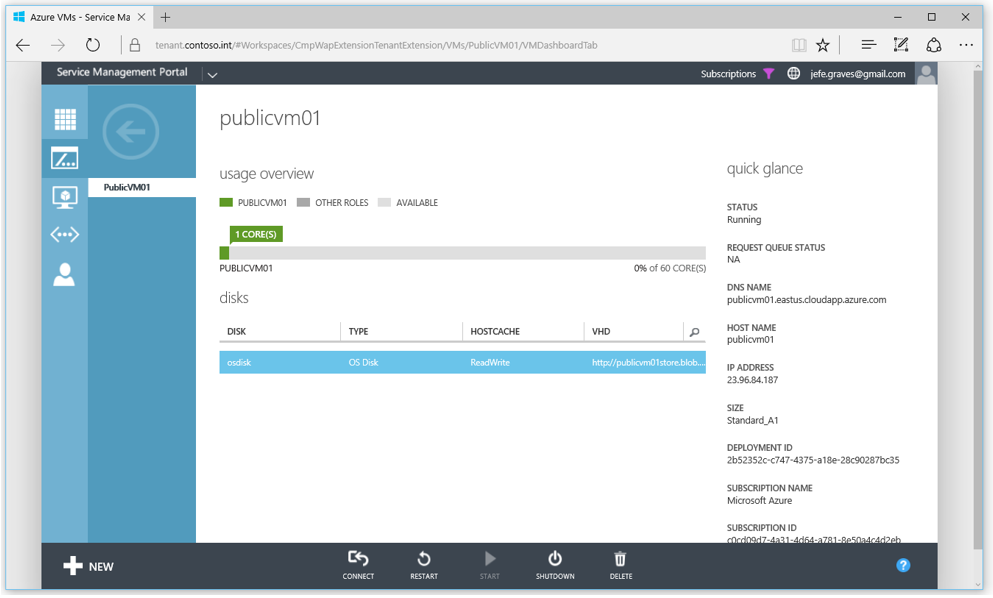
  • Tenant Extension – UI extension for Azure Pack that enables tenant self-service provisioning and management of Azure VM’s.

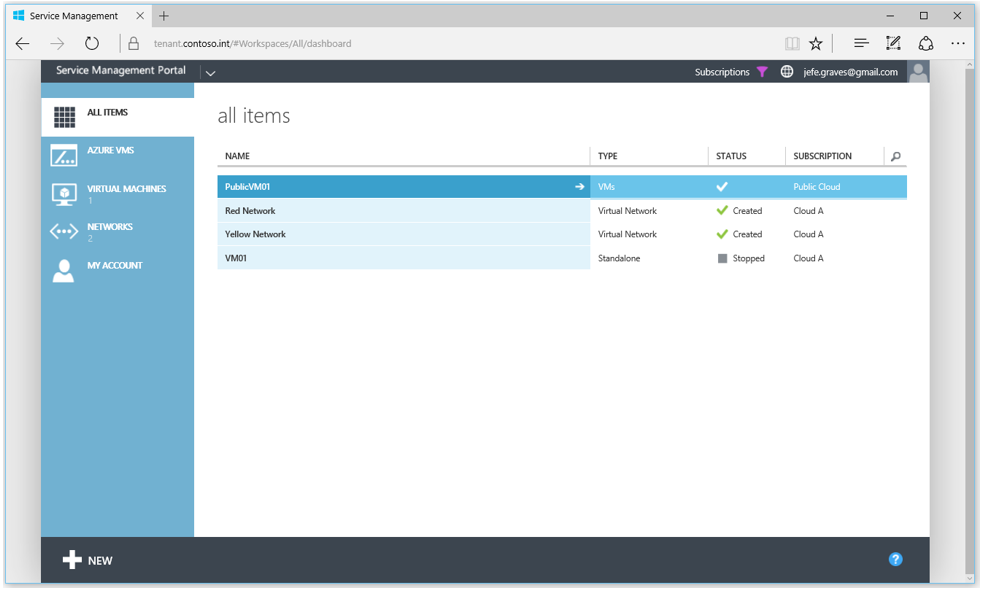
The Azure Pack Connector subscription model uses a 1-to-1 mapping of Azure Pack plans to Azure Subscriptions, allowing the administrator to control VM operating systems and sizes on a per plan basis and Azure regions globally. Once a user has a subscription to an Azure Pack plan that has an attached Azure subscription, they can provision and manage Azure VM’s through the Azure Pack tenant portal.

Azure Pack Connector Dashboard

This video walkthrough will help explain the features and demonstrate how to use Azure Pack Connector:

The Azure Pack Connector solution is published on GitHub:

https://github.com/Microsoft/Phoenix

Head on over and grab the binaries to expand your Azure Pack installation today!