SQL Server Reporting Services error installing DPM 2012 SP1 with remote SQL 2012 database

We use Microsoft Data Protection Manager in our environment to protect our Windows workloads. Recently, DPM 2012 SP1 was released and we have begun the process of upgrading each of our DPM servers to this version, but encountered a problem with the latest server to be upgraded. Though the prerequisite check was successful, DPM would fail to install citing an error with SQL Server Reporting Services on our remote SQL 2012 server:
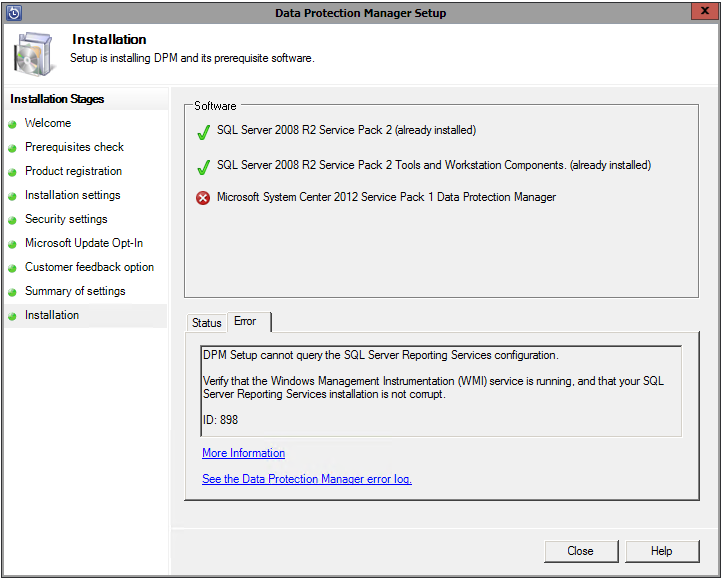
DPM Setup cannot query the SQL Server Reporting Services configuration

DPM Setup cannot query the SQL Server Reporting Services configuration

Viewing the error log, we can see the following error attempting to query the SSRS configuration via WMI:

[3/4/2013 12:05:44 PM] Information : Getting the reporting secure connection level for DPMSQL01/MSSQLSERVER
[3/4/2013 12:05:44 PM] Information : Querying WMI Namespace: \\DPMSQL01\root\Microsoft\SqlServer\ReportServer\RS_MSSQLSERVER\v10\admin for query: SELECT * FROM MSReportServer_ConfigurationSetting WHERE InstanceName=’MSSQLSERVER’
[3/4/2013 12:05:44 PM] * Exception : => System.Management.ManagementException: Provider load failure

DPM is using WMI to get information about the SSRS installation, and is getting a “Provider load failure” error message. The natural troubleshooting technique here is to attempt to run this query manually via wbemtest from the SQL server itself, and sure enough, we end up with a 0x80041013 “Provider Load Failure” error message:
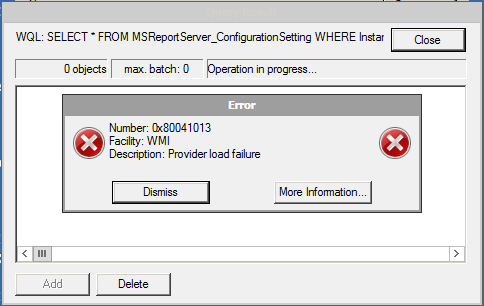
0x80041013 Provider Load Failure

0x80041013 Provider Load Failure

The SQL Server was originally deployed as SQL 2008 R2 and then upgraded to SQL 2012 SP1. Though there is a KB article describing this issue, there is no update for SQL 2012 SP1. You’ll also notice that the path mentioned in the error code includes v10 – which refers to SQL 2008. So, it seems as though the underlying problem has to do with an issue with the upgrade from SQL 2008 R2 to SQL 2012 and the WMI namespace.

Rather than open a PSS case to find the root cause, we decided it was probably faster to uninstall SQL entirely, then install a fresh instance of SQL 2012 and restore the DPM databases. If you choose to go this route, be sure to take a backup of your SSRS encryption key, DPM databases, master db, msdb, and the SSRS databases. If you don’t, you’ll spend hours reconfiguring reports, setting up SQL security and you’ll have to run DPMSync to recreate the SQL jobs.

SQL Server Authentication Channnel Encryption

We had a customer recently inquire as to whether the authentication channel between a client and a SQL Server was encrypted by default. While we know that SSL is supported on SQL Server 2005, we did not have a certificate installed. However, it was rumored that the system would use a self-signed certificate. Also, we wanted to explore the differences between SQL Server 2000 and SQL Server 2005, as well as the differences between different providers.

I searched for documentation confirming that the authentication channel was indeed encrypted and was able to come up with the following from this MSDN article: http://msdn2.microsoft.com/en-us/library/ms189067.aspx

Microsoft SQL Server 2005 can use Secure Sockets Layer (SSL) to encrypt data that is transmitted across a network between an instance of SQL Server and a client application. The SSL encryption is performed within the protocol layer and is available to all SQL Server clients except DB Library and MDAC 2.53 clients.

Credentials (in the login packet) that are transmitted when a client application connects to SQL Server 2005 are always encrypted. SQL Server will use a certificate from a trusted certification authority if available. If a trusted certificate is not installed, SQL Server will generate a self-signed certificate when the instance is started, and use the self-signed certificate to encrypt the credentials. This self-signed certificate helps increase security but it does not provide protection against identity spoofing by the server. If the self-signed certificate is used, and the value of the ForceEncryption option is set to Yes, all data transmitted across a network between SQL Server and the client application will be encrypted using the self-signed certificate.

Well, this contradicted some posts I had read but did point us in the right direction. So, we decided to test this. I setup two Virtual Machines, one running a .NET web application and a .NET windows application, and one running SQL Server 2005 Express Edition. I then installed Network Monitor 3.1 and captured the traffic on the NIC as we tested the connection using the SQL Native Client (SQLNCLI) and OLEDB (System.Data.SqlClient).

We saw the server send a self-signed certificate to the client and after which, the authentication channel was encrypted. We also ran the same test on SQL Server 2000. While the authentication channel is not encrypted with SQL Server 2000, the password is not sent in clear text. Rather, it appears obfuscated – most likely using an offset of some kind. We did see the username come across in clear text.

To summarize, when using SQL Server 2005, the authentication channel is completely encrypted when using any clients except DB Library and MDAC 2.53 clients regardless of whether the server has a SSL certificate installed.